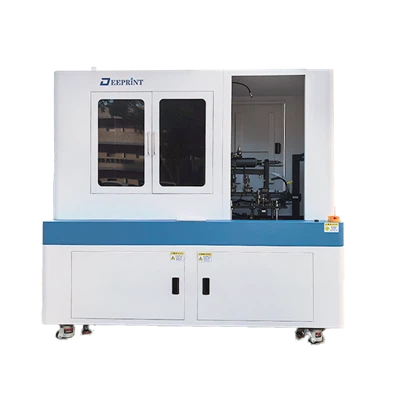
Troubleshooting common problems with a cylinder printing machine is an essential skill for anyone in the printing industry. As a supplier of cylinder printing machines, I’ve encountered a wide range of issues over the years. In this blog post, I’ll share some of the most common problems and provide practical solutions to help you keep your printing operations running smoothly. Cylinder Printing Machine
1. Ink Transfer Issues
One of the most common problems with cylinder printing machines is poor ink transfer. This can result in faded or uneven prints, which can significantly impact the quality of your output. There are several factors that can contribute to ink transfer issues, including:
- Ink Viscosity: If the ink is too thick or too thin, it may not transfer properly onto the printing surface. To solve this problem, you can adjust the ink viscosity by adding a thinner or a thickener, depending on the situation.
- Cylinder Pressure: Incorrect cylinder pressure can also cause ink transfer problems. If the pressure is too high, it can cause the ink to spread too much, resulting in blurred prints. If the pressure is too low, the ink may not transfer at all. To adjust the cylinder pressure, you can use the pressure adjustment mechanism on your printing machine.
- Surface Condition: The condition of the printing surface can also affect ink transfer. If the surface is dirty or rough, the ink may not adhere properly. To solve this problem, you can clean the printing surface with a suitable cleaning agent and ensure that it is smooth and free of debris.
2. Registration Problems
Registration refers to the alignment of the different colors in a multi – color print job. When registration is off, the colors may not line up correctly, resulting in a distorted or unprofessional – looking print. Here are some common causes and solutions for registration problems:
- Mechanical Misalignment: Over time, the mechanical components of the printing machine may become misaligned. This can be due to normal wear and tear or improper handling. To correct mechanical misalignment, you may need to adjust the position of the cylinders, gears, or other components. It’s important to follow the manufacturer’s instructions when making these adjustments.
- Paper Expansion or Contraction: Changes in temperature and humidity can cause the paper to expand or contract, which can lead to registration issues. To minimize this problem, you can store the paper in a controlled environment and allow it to acclimate to the printing environment before use.
- Incorrect Settings: Incorrect settings on the printing machine, such as improper tension on the paper feed or incorrect registration marks, can also cause registration problems. Make sure to double – check all the settings and ensure that they are correct for the specific print job.
3. Cylinder Wear and Tear
The cylinders in a printing machine are subject to a lot of wear and tear over time. This can lead to a variety of problems, including uneven printing, poor ink transfer, and reduced print quality. Here are some ways to address cylinder wear and tear:
- Regular Maintenance: Regular maintenance is crucial for preventing excessive cylinder wear. This includes cleaning the cylinders after each print job, lubricating the moving parts, and inspecting the cylinders for signs of damage or wear.
- Cylinder Replacement: If the cylinders are severely worn or damaged, they may need to be replaced. It’s important to use high – quality replacement cylinders that are compatible with your printing machine.
- Proper Usage: Using the printing machine correctly can also help to reduce cylinder wear. Avoid overloading the machine, using incorrect inks or papers, and subjecting the cylinders to excessive pressure.
4. Paper Jam Issues
Paper jams are a common problem in cylinder printing machines and can be very frustrating. Here are some common causes and solutions for paper jams:
- Incorrect Paper Loading: If the paper is loaded incorrectly, it can cause a jam. Make sure to follow the manufacturer’s instructions for loading the paper, including the correct orientation and alignment.
- Paper Quality: Low – quality paper or paper that is too thick or too thin can also cause paper jams. Use high – quality paper that is recommended for your printing machine.
- Feed Mechanism Problems: The paper feed mechanism may be malfunctioning, causing the paper to jam. Check the feed rollers, belts, and other components for signs of damage or wear. If necessary, clean or replace these components.
5. Electrical and Control System Issues
The electrical and control systems of a cylinder printing machine are responsible for regulating the various functions of the machine. Problems with these systems can cause the machine to malfunction or stop working altogether. Here are some common electrical and control system issues and their solutions:
- Power Supply Problems: A faulty power supply can cause the machine to shut down or not start at all. Check the power cord, outlet, and circuit breaker to ensure that the machine is receiving power.
- Sensor Malfunctions: Sensors are used to detect various conditions in the printing machine, such as paper presence and cylinder position. If a sensor is malfunctioning, it can cause the machine to operate incorrectly. Check the sensors for damage or dirt and clean or replace them if necessary.
- Software Glitches: The control software of the printing machine may have glitches or bugs that can cause problems. Make sure to keep the software up – to – date and contact the manufacturer for technical support if you encounter any software – related issues.
6. Preventive Maintenance Tips
To minimize the occurrence of common problems with your cylinder printing machine, it’s important to implement a preventive maintenance program. Here are some tips:
- Regular Cleaning: Clean the printing machine regularly, including the cylinders, inking system, and paper feed mechanism. This will help to prevent the buildup of dirt, ink, and debris, which can cause problems.
- Lubrication: Lubricate the moving parts of the machine according to the manufacturer’s recommendations. This will help to reduce friction and wear, and extend the lifespan of the machine.
- Inspection: Regularly inspect the machine for signs of wear, damage, or malfunction. Replace any worn or damaged parts as soon as possible to prevent further problems.
- Operator Training: Ensure that your operators are properly trained on how to use and maintain the printing machine. This will help to prevent operator – error – related problems.
Conclusion

Troubleshooting common problems with a cylinder printing machine requires a combination of knowledge, experience, and patience. By understanding the common causes of these problems and implementing the appropriate solutions, you can keep your printing machine running smoothly and produce high – quality prints.
Visual Positioning Flatbed Printer If you’re experiencing persistent problems with your cylinder printing machine or are considering purchasing a new one, I encourage you to reach out to us. Our team of experts is ready to assist you with any questions or concerns you may have. We offer a wide range of high – quality cylinder printing machines and provide comprehensive after – sales support. Contact us to start a discussion about your printing needs and explore how our products can meet your requirements.
References
- Printing Industry Handbook: A comprehensive guide to the printing industry, including information on cylinder printing machines and troubleshooting.
- Manufacturer’s Manuals: The manuals provided by the manufacturer of your cylinder printing machine contain detailed information on operation, maintenance, and troubleshooting.
Shenzhen Deeprint Technology Co., Ltd.
As one of the most professional cylinder printing machine manufacturers and suppliers in China, we’re featured by quality products and good service. Please rest assured to buy customized cylinder printing machine made in China here from our factory. Contact us for free sample.
Address: 6-1, Huangwu Road, Tongle Community, Baolong Street, Longgang District, Shenzhen City 518100,China.
E-mail: ellen@uvdprint.com
WebSite: https://www.uvd-print.com/
